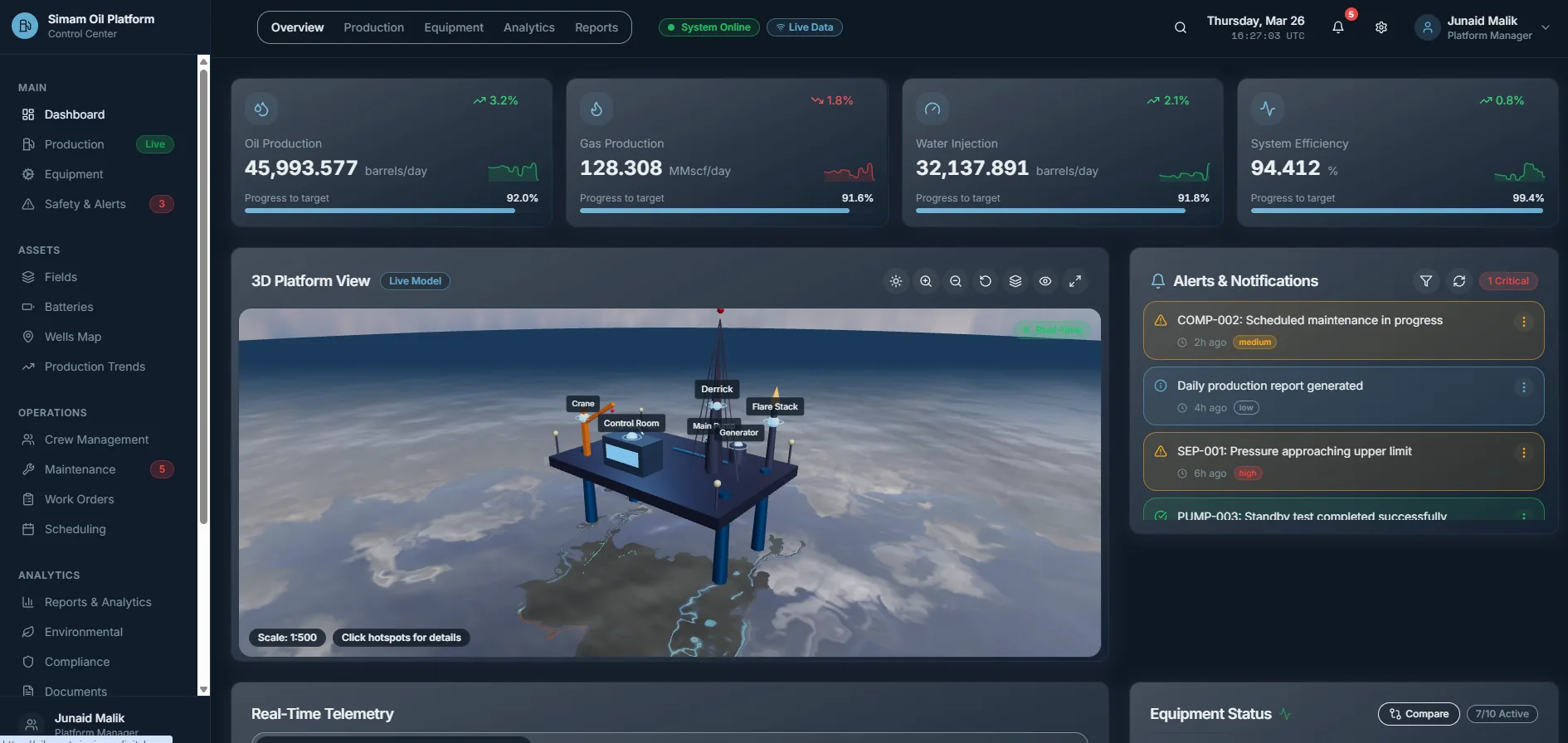
Most digital twin briefs are really dashboard briefs
When a business asks us for a digital twin, the underlying problem is almost always one of four things: nobody can see current status, nobody can find where something is, nobody can agree what a change would do, or nobody outside the room can picture the site. Those four problems have four different answers, and only one of them is a digital twin.
Picking the wrong one is expensive in a specific way. A dashboard that should have been a twin gets rebuilt in eighteen months. A twin that should have been a dashboard costs several times as much, takes far longer, and then gets opened twice a quarter: because what people actually needed was a number on a screen.
If you want the technology explanation first (what a twin is, the component, asset and process types, how the data flows) read our complete guide to digital twins. This page is about choosing.
Start from the question your team keeps asking
Write down the question people ask most often in the operations meeting. The grammar of that question tells you what to build.
- “How many, how much, how long?” You need a dashboard. The answer is a number and a trend.
- “Where is it?” You need a map or a 3D view. The answer is a position.
- “What does it look like on site?” You need a capture or a visualisation. The answer is an image.
- “What happens if we change this?” You need a simulation. The answer is a prediction.
- “What changed since last week, and why?” This is the one that genuinely needs a twin.
That last question is the tell. A digital twin earns its cost when the answer requires live state, history and geometry together: when you need to know that pump 12 is running hot, that it has been drifting for nine days, and that it sits under the walkway you were about to close for maintenance.
The four things, and what each one is for
A dashboard aggregates data you already have and shows status. It needs your systems to expose that data, and someone to agree what “good” looks like. It is the cheapest of the four and the one most teams should build first.
A 3D visualisation is a model or a captured scene you can move around in. It is a communication tool: stakeholder buy-in, sales, planning approvals, site induction. It carries no live data and does not need any.
A simulation models behaviour so you can test scenarios: throughput on a line, traffic through a junction, evacuation from a floor. It answers what-if questions, and it is judged on whether its predictions hold.
A digital twin is the combination: geometry, plus live data, plus history, kept in sync with the real thing. It is the most useful and the most expensive, because the cost is not the model. It is the integrations that keep the model true.
The cost is the data, not the graphics
The most common budgeting mistake is pricing the 3D and forgetting the plumbing. A good-looking model is a known quantity. Connecting it to a maintenance system, a sensor network, a scheduling tool and an access database, then keeping those connections alive when one of those systems is upgraded, is where the money and the risk sit.
Before you approve a twin, get a straight answer to three things: which systems hold the data, whether they have an API or an export you can read, and who inside the business owns each one. If two of those three answers are vague, build the dashboard first. It will surface the same data problems for a fraction of the cost.
A sensible order to build in
Almost every twin we have delivered was better for having been built in stages, and more than one stopped early because stage one turned out to be enough.
- Stage one: one view. The single screen that answers the meeting question. Real data, no geometry.
- Stage two: context. Add the map or model, so status has a place attached to it.
- Stage three: history. Store state over time, so you can answer “what changed”.
- Stage four: scenarios. Add simulation once people trust the data enough to argue with it.
Each stage is usable on its own. That matters more than it sounds. It means the project survives a budget freeze with something running, rather than a half-built platform nobody can log into.
What to ask a supplier before you sign
Five questions that separate a delivery partner from a demo.
- Which of my systems will you read from, and have you seen the actual data?
- What happens to the twin when one of those systems changes?
- What is running at the end of month one, not month nine?
- Who can update the model after you leave, and with what tools?
- What does it cost to host and maintain per year?
If the answer to the last question is a shrug, the project has a cliff in it. Hosting, licences and data egress on a live twin are an ongoing line item, not a rounding error.
Common questions
Is a digital twin just a 3D model?
No. A 3D model is a picture of the thing. A twin is kept in sync with the real thing using live or regularly updated data, and holds history so you can see what changed. If nothing updates, you have a visualisation: a perfectly good product, but a different one.
Do I need sensors and IoT to start?
Not usually. Most useful first versions read data that already exists in systems you are paying for: a maintenance database, a scheduling tool, a spreadsheet an engineer updates every morning. Sensors are worth adding once you know which measurement is missing.
How much does a digital twin cost in the UK?
A focused first version, one operational view against real data, is the cheapest useful thing: a rapid MVP. A production twin with live integrations, permissions and support is several times that. The spread is almost entirely down to how many systems it has to talk to, which is why the figure comes after we know and not before.
What is the difference between a digital twin and a simulation?
A simulation predicts what would happen under conditions you specify. A twin reflects what is actually happening now. Many twins contain a simulation, but you can have either one without the other.
How long before we see something usable?
A first operational view should be in front of users inside four to six weeks. If a proposal has nothing testable before month three, ask what can be pulled forward: early feedback is what stops you building the wrong screens.
Related guides
- What is a digital twin? Complete guide: the definitions, the three twin types, and how the data flows
- Digital twin vs simulation vs 3D visualisation: the three side by side
- Website, app, dashboard or SaaS?: the same decision, one level up
- Connected highways digital twin: what one looks like in production